Introducing Guided Agentic Workflows by MiniMind AI
MiniMind AI Guided Agentic Workflows move beyond one-shot prompts with orchestration, human-in-loop review, branching, retry, pause/resume, and packaged outputs.
Introducing Guided Agentic Workflows by MiniMind AI
AI tools are moving beyond one-shot prompts. The next useful interface is not just a smarter chat box. It is a guided system that can collect the right inputs, run the right steps, pause for human judgment, retry when something fails, and package the final output in a format people can actually use.
That is the idea behind Guided Agentic Workflows in MiniMind AI.
Where a normal AI tool answers one request, a workflow coordinates a full process. It can extract requirements, generate intermediate artifacts, branch into multiple outputs, ask the user to approve a decision, and then compose a final package.
This builds directly on the CAPi framework: instead of forcing users to engineer perfect prompts, MiniMind AI gives them structured, progressive interaction.
Why Workflows Matter
Most real tasks are not single-step tasks.
A founder does not just need "startup ideas." They need ideas, scoring, market positioning, a launch plan, and copy.
A developer does not just need "architecture advice." They need assumptions, functional requirements, architecture, database schema, API contracts, diagrams, and infrastructure recommendations.
A marketer does not just need "a LinkedIn post." They may need one source converted into a LinkedIn post, Twitter/X thread, Instagram carousel, email summary, blog summary, and a final approved content pack.
That is why MiniMind AI workflows are designed as guided execution paths, not loose conversations.
What Guided Agentic Workflows Can Do
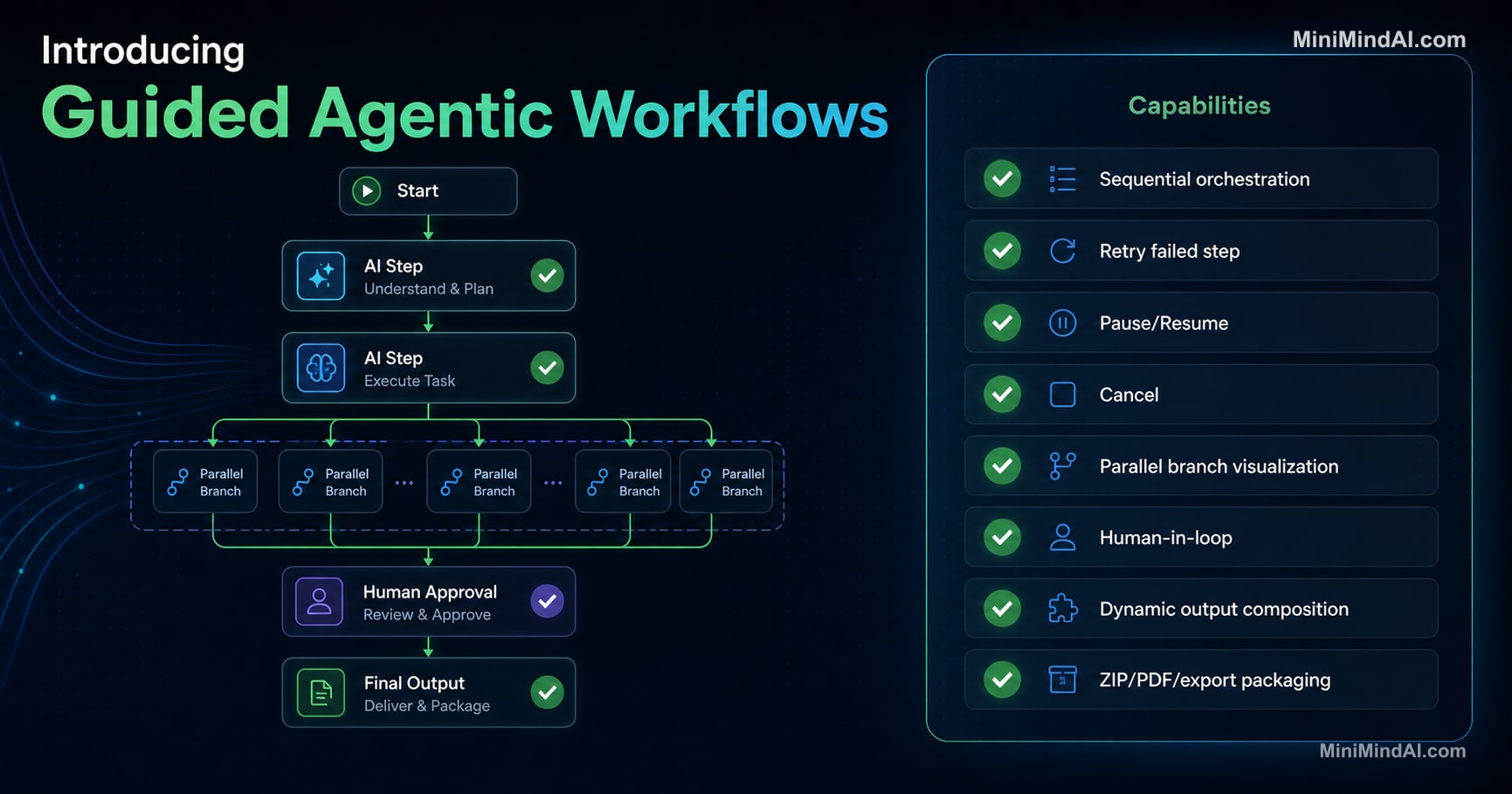
MiniMind AI workflows combine orchestration, state, human review, branching, and export packaging.
| Capability | Status |
|---|---|
| Sequential orchestration | ✅ |
| Retry failed step | ✅ |
| Pause/Resume | ✅ |
| Cancel | ✅ |
| Parallel branch visualization | ✅ |
| Human-in-loop | ✅ |
| Dynamic output composition | ✅ |
| ZIP/PDF/export packaging | ✅ |
These capabilities matter because they make AI behavior more predictable. A workflow can show where the process is, what has already happened, what is waiting for the user, and what output was produced by each step.
From Prompting to Orchestration
Traditional chat-based AI puts most of the burden on the user:
- Define the task
- Remember context
- Ask for the next step
- Copy output between prompts
- Decide when to regenerate
- Format the final deliverable
Guided workflows move that responsibility into the system.
The user provides the core intent and configuration. MiniMind AI then runs a structured process with known steps, step-level outputs, status tracking, and export actions.
That is the practical side of CAPi:
- Config Augmented: users set preferences once, such as tone, format, channels, or architecture style.
- Progressive Interaction: the system asks the right questions at the right time.
- Structured Output: the final result is composed from meaningful intermediate artifacts, not only a single blob of text.
Human-in-the-Loop Is a Feature, Not a Limitation
Many AI systems try to remove the human too early. That creates risk.
MiniMind AI workflows intentionally support human checkpoints. A workflow can pause and ask the user to:
- select an option
- answer a questionnaire
- approve generated assets
- adjust final tone
- decide which branches continue
This is especially important for content, architecture, legal, finance, hiring, product planning, and any workflow where judgment matters.
The AI should do the heavy lifting. The human should keep control of the decisions.
Parallel Branches Without Runtime Chaos
Some workflows need branches. For example, one content source can become:
- LinkedIn post
- Twitter/X thread
- email newsletter
- Instagram carousel
- blog summary
MiniMind AI can visualize these as parallel branches while still executing them in a deterministic order behind the scenes. That gives users the right mental model without adding unnecessary operational complexity.
For V1, that tradeoff is intentional: clear visual branching, simple execution, predictable results.
Dynamic Output Composition
The final output of a workflow should not always be one text response.
Some workflows produce multiple useful artifacts:
- markdown reports
- diagrams
- JSON specs
- API contracts
- content packs
- exportable packages
MiniMind AI workflows can compose final output sections from selected step outputs. If a branch is skipped, its final output can be omitted. If a workflow produces multiple files, export can package them as a ZIP. PDF and copy actions can operate from the rendered output rather than only raw text.
That makes workflow output closer to a deliverable.
Explore Workflows in MiniMind AI
Guided Agentic Workflows are now part of the MiniMind AI direction: structured AI experiences that move beyond chat, while still keeping the user in control.
Start with the MiniMind AI Workflows page to explore available workflows.
For the design thinking behind this interface direction, read Why Chat Interfaces Are Not Enough for AI Tools: Introducing CAPi.
MiniMind AI is building toward AI tools that feel less like prompting and more like reliable execution.